
Chrome extension
The meeting writes itself, and the audio never leaves
Ata records the call, transcribes it inside your own Chrome, and hands back a summary, the decisions, a task list with owners and dates, or the follow-up email. There is no server of ours for the recording to travel to — we did not build one.
Why we built a note-taker that cannot phone home
Every meeting-notes product we looked at asked for the same thing first: upload the call to us. For a studio sitting in client architecture reviews, salary conversations and NDA-covered roadmaps, that is not a checkbox — it is a reason not to install anything at all. So we wrote the version we were willing to run ourselves.
Ata is a Chrome extension. It records your microphone or the audio of the tab a meeting is playing in, and transcribes it with the speech recognition already built into Chrome — on the machine, while you are still talking. The transcript is editable, because every recogniser mangles names, and the corrected text is what the documents are built from.
There is no backend. No account, no sync, no telemetry, and nothing for us to breach: recordings sit in the browser profile's own storage, and uninstalling the extension takes them with it. Document generation is the one step that can reach the network, and only if you bring your own Anthropic, OpenAI or Google key — in which case the text goes from your browser straight to that provider, never through us.
We publish it free because it is the most honest thing we can hand a prospective client: here is a real product, shipped, with the trade-offs written down instead of hidden.
Record, transcribe, generate
A still screenshot cannot show the part that matters — that the transcript appears while the meeting is still running, and the document assembles itself out of what was actually said. So here is the sequence, on a loop.
- Record
- Transcribe
- Generate
Quarterly planning
Tab audio — Google Meet
TranscriptOn device
listening…
Documents
Built from the transcript
Pick a template once the transcript is ready
An animation of the real flow, not a recording of it. Nothing on this page captures or sends audio.
What it actually does
Six things, each one finished. Every card opens the product itself.
Microphone or tab audio
Record yourself, or capture the audio of the tab a Meet, Teams or Zoom web call is playing in — and keep hearing it normally. Already have the file? Drop it in.
Open Ata – Microphone or tab audioTranscription on your device
Chrome's own speech recognition runs locally while you record, so the transcript builds up live. If Chrome cannot guarantee it stays local, Ata stops and tells you rather than quietly reaching for the network.
Open Ata – Transcription on your deviceFive templates, one transcript
Summary, decisions with the reasoning behind them, a task table with owner and deadline, a follow-up email ready to send, or free notes organised by topic. Generation uses your own Anthropic, OpenAI or Google key — no key, nothing leaves.
Open Ata – Five templates, one transcript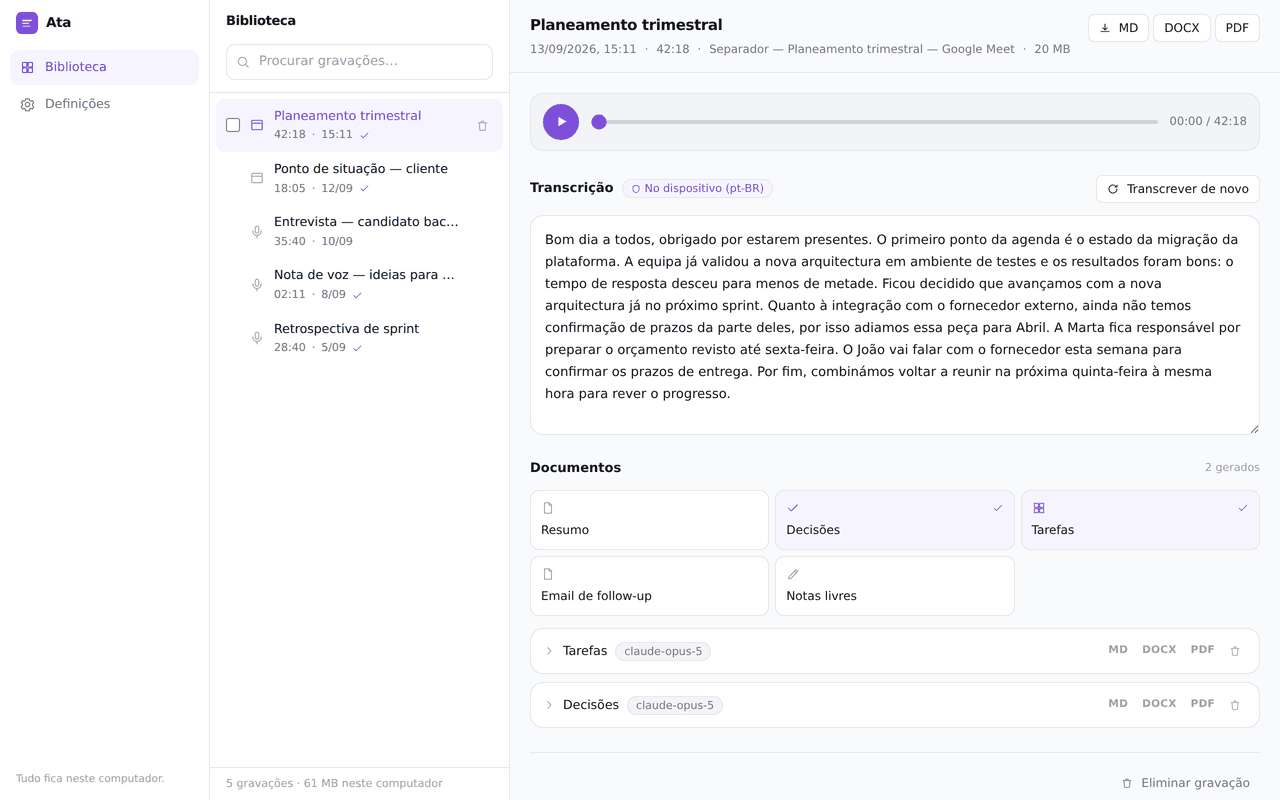
Markdown, DOCX and PDF
Markdown for the wiki, Word for the people who live in Word, PDF for sending. All three are produced in the browser, so the export is not a round trip either.
Open Ata – Markdown, DOCX and PDFTry it before installing
The product site runs the full dashboard as a live playground with sample data. Click through the library, the transcript and the templates without giving Chrome a single permission.
Open Ata – Try it before installingRetention you control
Delete the audio the moment a transcript exists, or clear anything older than 7, 30 or 90 days. API keys are encrypted with a non-extractable Web Crypto key, and the extension installs with no access to any site at all.
Open Ata – Retention you control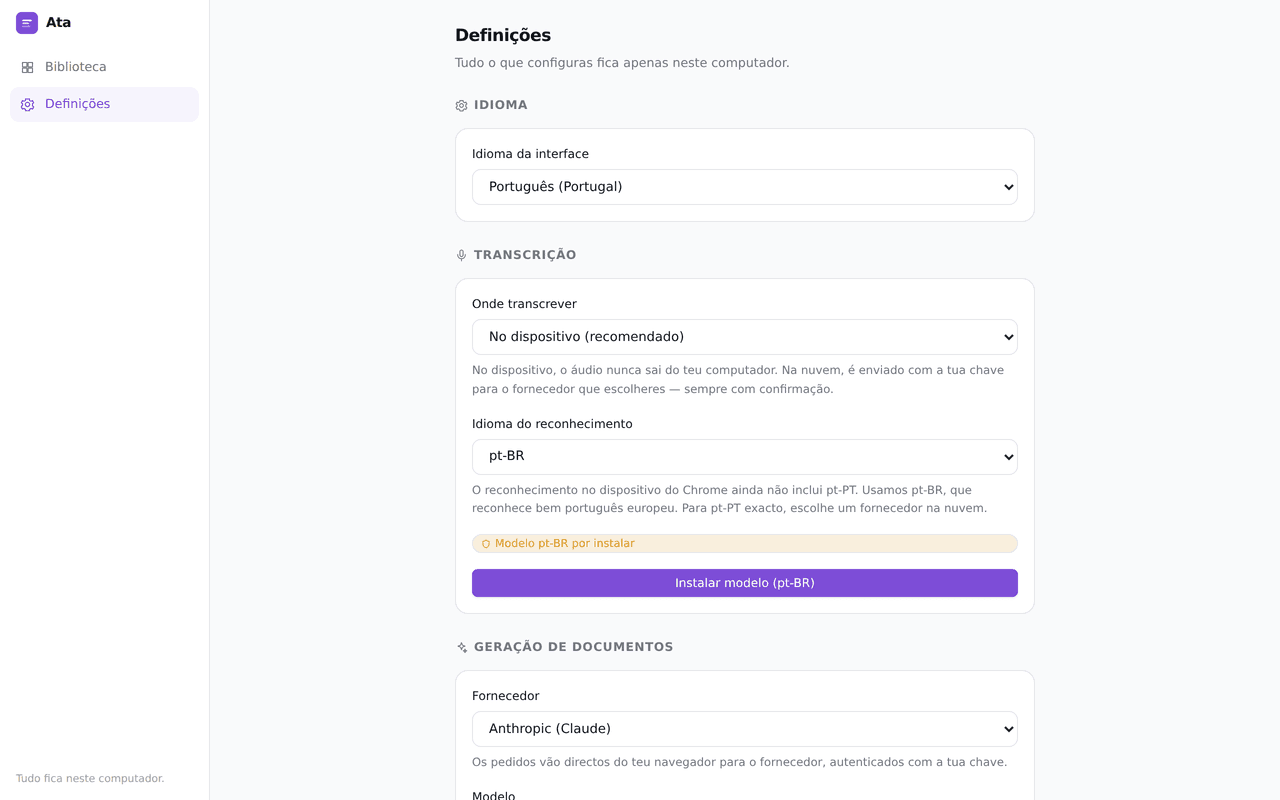
Where it fits, and where it does not
The architecture that makes it private is the same architecture that rules some things out. Both halves are below.
What it is
- A free Chrome extension for meetings you would rather not upload anywhere
- On-device transcription, with a manual fallback that is always available
- Five document templates, generated with your own API key or not at all
- Markdown, DOCX and PDF export produced in the browser
- Built and run by the studio that would otherwise be building yours
What it is not
- Not a cloud service — there is no account, no sync and no second device
- Chrome only; it is not a Firefox, Safari or desktop-app recorder
- No speaker labels or diarisation — it is one transcript, not a cast list
- The interface is in European Portuguese today, with i18n groundwork in place
- Chrome ships no on-device pt-PT model, so recognition runs on pt-BR and the app says so
Ata by Lusivision
Opens ata.lusivision.com — free, no account, no card.
The questions people ask first
Does the audio really never leave my computer?
It never reaches us — we run no server, so there is nowhere for it to arrive. It leaves your machine only if you deliberately choose cloud transcription with your own key, and Ata asks for confirmation every time. By default the recognition runs inside your Chrome.
Do I need an API key?
Only to generate documents. Recording, transcribing on the device, editing the transcript and exporting to Markdown, DOCX or PDF all work with no key at all. Add an Anthropic, OpenAI or Google key and you pay that provider directly — there is no billing relationship with us.
Where exactly are the recordings kept?
In the IndexedDB storage of the Chrome profile you installed the extension in — roughly 30 MB per hour of audio. They are not synced to another device or to your Google account. Uninstall the extension and Chrome removes them with it.
Does it work with Google Meet, Teams and Zoom?
With any meeting playing in a Chrome tab: choose to record that tab and Ata captures its audio while you carry on hearing it. For Zoom or Teams running as an installed desktop app, record through the microphone instead.
Is it available in English?
Not yet. The interface and the generated documents are in European Portuguese, and the extension is built for translation rather than hard-coded. If you want it in your language, tell us — that is the kind of thing a real user asking moves up the list.
Can I record a meeting without telling the others?
Technically yes; legally, in Portugal and across the EU, recording a conversation without the participants' consent is generally unlawful. Tell people. The tool exists so you leave a meeting with notes, not so you leave with evidence.
Could Lusivision build something like this for us?
Yes — that is the day job. Browser extensions, local-first products, on-device AI and the web apps around them are exactly the work we take on. Ata is what our approach looks like when we are the client.
The work behind a product like this
What we do when the client is someone else.
AI Development
AI development services for businesses: language model integration, RAG systems, AI automation and internal assistants — built with clear boundaries, human review and measurable outcomes.
Custom Software
We build custom software around how your business actually works: web applications, business platforms, system integrations and process automation. Discovery, delivery and long-term maintenance.
AI Agents
AI agent development for businesses: customer support, lead qualification, booking and internal knowledge agents — with tool integration, human approval and real monitoring.
More on this from our blog
Where we go deeper on AI, automation and building software that respects the people using it.
AI Meeting Notes in 2026: From Transcript to Action
AI note-takers now sit in most business meetings. Here is what they actually do well, where they fail, and how to wire the output into work that gets done.
AI Browsers for Business: A 2026 Reality Check
ChatGPT Atlas is gone and the AI-browser hype has cooled. Here is what agentic browsers like Comet and Gemini really mean for your website and your team.
AI Agent Skills: What They Are and Why They Matter
Agent skills are reusable, versioned capability packages that turn AI agents into dependable operators. Here's what they mean for your business in 2026.
AI Call Centers in 2026: What They Cost and When to Build
AI call centers now answer and place calls on their own. Here is what they actually cost, the three pricing models, and when a custom build beats a platform.
Have a workflow that should not live in someone else's cloud?
Ata is one answer, for meetings, in Chrome. If your team has a process that every off-the-shelf tool wants to host for you, that constraint is usually the most interesting part of the brief. Send it over.